
Start with 300 bonus credits if you go Premium in the first 72 hours. See plans

For short-form · beta

Yutee

One long video in. Short captioned clips out.

  • Captions, word by word
  • Follows whoever is talking
  • Your video stays on your PC

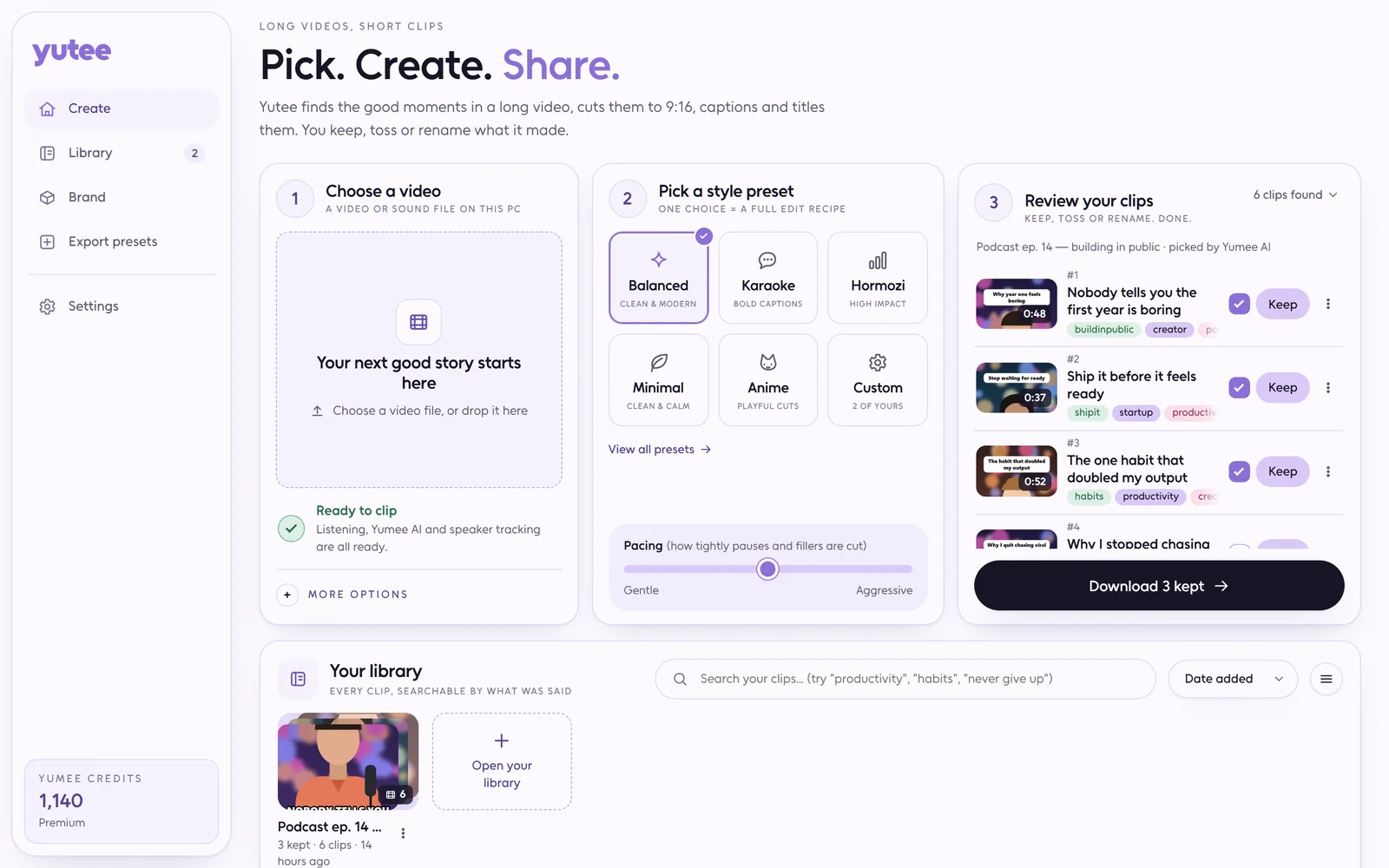
Yutee takes the podcast, stream or talk you recorded and finds the bits worth posting. It cuts them into 9:16 clips for Shorts, Reels and TikTok, adds word-by-word captions, keeps the speaker in frame and even writes the title.

Keep the clips you like, toss the rest and download the lot as a zip. Yutee is in beta for Premium and Ultra members.

Why might Windows or an antivirus warn about this? Last checked on VirusTotal: 22 October 2026

Last VirusTotal check

22 October 2026 4 days ago

61 of 62 scanners found nothing in version 4.0.1

Microsoft Defender: clean

The one that did not guesses from how the file is packed, not from anything it found inside (see below). The report shows its name for it.

Open the full VirusTotal report

Is Yutee safe?

Yes. Yutee does what this page describes and nothing more: it only shares your sign-in with yumee.org, nothing runs until you press a button, and every update is checked against its fingerprint before it replaces anything. You can remove it any time in Settings, Apps.

Then why does a scanner complain?

Because it is new. An app without a paid code-signing certificate starts with no reputation, and a few scanners distrust any unknown program that comes as one file and installs and updates itself. That is a guess from the shape of the file, not something harmful found in it, and it fades as more people use the app.

What the scanners notice in Yutee

  • One file: the whole app (about 140 MB) is packed into a single .exe by .NET single-file publishing (build.ps1, PublishSingleFile). Scanners see a small starter with a large "overlay" they cannot look inside.
  • Not signed yet: without a code-signing certificate Windows cannot show who made it, so its reputation starts at zero.
  • Installs itself: on its first start it copies itself to %LocalAppData%\Programs\Yutee and adds a Start menu shortcut and a Settings, Apps entry (YumeeInstall.cs).
  • Updates itself: it downloads the new version from yumee.org, checks its size and SHA-256, and swaps the file (YumeeUpdate.cs).
  • Sets up helpers: the first start downloads pinned tools (Python, ffmpeg) from their official sites, checks each one against a SHA-256, and starts a local helper process (SetupSteps.cs, EngineProcess.cs).

Windows stopped it. What now?

On the blue SmartScreen screen choose More info, then Run anyway. If Defender moved it to quarantine, restore it in Windows Security, Protection history, once you have checked the fingerprint below.

How do I know my file is the real one?

Compare its fingerprint. In PowerShell, Get-FileHash on the downloaded file must print exactly this:

SHA-256 of Yutee-4.0.1.exe db534de88ab02a66c204d7de815211ef27c48ff0cfb41e6c1d3f2e9faa2e9f31
Why you'll love Yutee

  • It finds the good bits

    Yumee AI reads what was said and picks the moments that stand on their own. Each clip opens on its strongest line, so nobody scrolls past.

  • The speaker stays in frame

    It follows whoever is talking, cuts when the camera cuts, and keeps the picture calm instead of chasing every nod.

  • Captions with personality

    Balanced, Karaoke, Hormozi, Minimal, Anime or your own recipe, with your logo, handle and colour on every clip.

  • Your video stays home

    Listening, face tracking and rendering all run on your PC. Only the words of a possible clip ever go to Yumee AI.

  • Picks up where it stopped

    Close Yutee halfway through a render and it carries on from the same spot next time.

  • Fair about credits

    Credits are set aside by video length before it starts, and whatever isn't used comes straight back. A cancelled run costs nothing.

One long recording in, a folder of clips ready to post out, and your evening still free.

How a run goes

  1. Give it the video

    Choose a video on your PC or drop it on the window.

  2. Pick a preset

    Caption style, aspect and how hard to cut. Your brand is applied on top.

  3. Let it run

    Transcribe, score, judge, reframe, render — one progress bar, and it survives being closed.

  4. Keep what is good

    Watch each clip, rename it, toss the rest, download the keepers as a zip.

What it costs

  • Make clips from a video 10 credits / 10 min
  • New titles for one clip 1 credit / clip

Every app shows the price before it starts, and work that fails is refunded on its own.

Plans and credit packs

What it needs

  • Windows 10 or 11, 64-bit
  • A Yumee account on Premium or Ultra while Yutee is in beta, and credits for Yumee AI
  • About 2.6 GB for the parts it sets up for you the first time, speech recognition included
  • An NVIDIA card makes transcription much faster; it is not required

Download it and open it once: it installs itself, with a shortcut in the Start menu and on the desktop. Sign in with your Yumee account and it gets what it needs with one progress bar. It keeps itself up to date, and your files stay on your PC.

What's new in Yutee

  1. Version 4.0.1

    • Deleting a video now also frees the space its copy, its transcript and its work files took on this PC; your own file is never touched
    • Clips with captions are made even when your Windows name has an apostrophe or a percent sign in it
    • If you stop a video after Yumee AI has picked its moments, that judging is charged once and Retry carries on at no extra cost
    • When your account reaches its Yumee AI limit for the day, Yutee says so and still makes the clips, picking the moments on this PC
  2. Version 4.0.0

    • Each video has its own review: a wall of vertical clips showing only the score and your call, with Keep and Toss when you point at one
    • Open a clip large to watch it beside its score, Yumee AI's four scores as bars, why it was picked, and Keep, Later and Toss
    • Walk the clips with the arrow keys, decide with K, X and U, and accept all of Yutee's suggestions at once
    • The side panel lists your recent videos with their progress; the library shows each video as a card and searches every clip
    • Faster to open and lighter while a video is being made: Yutee asks for less, and nothing while its window is hidden
  3. Version 3.2.7

    • While Yutee is open it checks for a new version every 15 minutes, so the restart card shows up soon after one is out
    • When Yumee asks for the newest Yutee before judging, the run note and new titles say so and tell you how to update
  4. Version 3.2.6

    • The whole top edge of the Yutee window now moves it, not just a few spots
    • Yutee shows its version in small text next to its name
    • When Yumee AI is busy, Yutee waits for a free turn and never asks for more judgements at once than your plan allows
  5. Version 3.2.5

    • When something goes wrong, Yutee now says in plain words what happened and what to try, instead of showing technical error text
    • Settings and the speaker-tracking step now describe what Yutee does in everyday words
    • First-time setup lists plain steps instead of the names of the packages it installs
Earlier versions
  1. Version 3.2.4

    • Yutee's Start menu, desktop and taskbar shortcuts now pick up the current icon right after the app updates itself
  2. Version 3.2.3

    • Yutee no longer opens unchecked when a busy or blocked connection sends back something other than your account's answer
    • An update stopped by a blocked connection now asks you to try again later instead of saying your account can't download Yutee
  3. Version 3.2.2

    • Library thumbnails show the whole clip again, not just its top edge
    • Clip tiles in the library are now upright, the same shape as the clips they preview
  4. Version 3.2.1

    • A new Yutee icon on the window and in the tray, where your Clips ready notices appear
  5. Version 3.2.0

    • Yutee now works only with video files on your PC: pasting links is gone
    • Choose a video or drop it on the window, and everything else works as before
  6. Version 3.1.0

    • Choosing or dropping a video file works again: the window no longer turns white
    • The frame now follows whoever is talking, cuts with the camera and stays steady
    • Clips open on their strongest line, with an optional flash-forward teaser
    • Tighter cuts with zooms timed to the words that land
    • Plainer wording everywhere, with the technical settings under Advanced
  7. Version 3.0.0

    • A lighter look on every page, with one status line while your clips are being made
    • Faster first start: Yutee skips what this PC already has
    • Downloading Yutee now takes a Yumee account that can make clips with it
  8. Version 2.2.1

    • Pasted links are checked before anything is downloaded (links were removed in 3.2.0)
    • Face tracking and the setup packages are checked before they are used
  9. Version 2.2.0

    • Clips are judged by Yumee AI and paid with credits
    • Out of credits or offline, the free judge on this PC takes over
    • The Create page shows what a run costs and what you have
    • Ask Yumee AI for new titles for any clip
    • One progress bar for the whole first-run setup
  10. Version 2.1.0

    • Yutee is now a Windows app that installs what it needs on the first start
    • Save As for downloads, and a tray notification when your clips are ready
    • Sign in to Yutee with your Yumee account
  11. Version 2.0.0

    • One button: drop a file (or, until 3.2.0, paste a link), pick a preset, get finished clips
    • Faces are tracked and kept in frame in the vertical 9:16 cut
    • Every clip comes with a title, a hook, a description and hashtags
    • Even loudness on every clip, and runs that resume where they stopped
    • Keep, toss or rename clips and download every kept one at once
  12. Version 1.0.0

    • Upload a video and get a captioned vertical clip
    • Edit captions, reframing and export for each clip, with a caption style gallery
    • Cut silences and filler words, with a preview of what would go before anything is rendered
    • Loop seams, first-frame picks and a guard against cutting the same moment twice
    • Projects, and a clip library you can search by what is said

Questions about Yutee

Is my video uploaded anywhere?

No. Transcription, face tracking and rendering all happen on your PC. Only the words of a candidate clip go to Yumee AI, and nothing is stored after it answers.

What does a run cost?

Credits by source length, reserved before the first stage. Whatever is not used is refunded when the run ends, and a failed or cancelled run is released in full.

What if I run out of credits, or work offline?

The run still happens, with the free ranking instead of Yumee AI, and it records why. Nothing is lost.

Can I change a clip after it is made?

Yes — rename it, retitle it with Yumee AI for a credit, adjust the crop, or re-render it with a different preset.