
Start with 300 bonus credits if you go Premium in the first 72 hours. See plans

For sellers

Vintee

A pile of photos in. Ready listings out.

  • Listings in your own voice
  • Prices that learn from you
  • You post, it never does

Vintee is for anyone with a wardrobe to clear and no patience for typing listings. Shoot your clothes on your phone, drop the whole batch in, and Yumee AI sorts the photos into garments, reads the size off the label and notes any flaws.

It suggests a fair price, writes the title and description in your own voice and tells you which photos to retake. You check it, paste it into the selling site you use, and stick a printed code on the bag so you always know which one sold.

Why might Windows or an antivirus warn about this? Last checked on VirusTotal: 22 October 2026

Last VirusTotal check

22 October 2026 4 days ago

53 of 54 scanners found nothing in version 4.0.7

Microsoft Defender: clean

The one that did not guesses from how the file is packed, not from anything it found inside (see below). The report shows its name for it.

Open the full VirusTotal report

Is Vintee safe?

Yes. Vintee does what this page describes and nothing more: it only shares your sign-in with yumee.org, nothing runs until you press a button, and every update is checked against its fingerprint before it replaces anything. You can remove it any time in Settings, Apps.

Then why does a scanner complain?

Because it is new. An app without a paid code-signing certificate starts with no reputation, and a few scanners distrust any unknown program that comes as one file and installs and updates itself. That is a guess from the shape of the file, not something harmful found in it, and it fades as more people use the app.

What the scanners notice in Vintee

  • One file: the whole app (about 140 MB) is packed into a single .exe by .NET single-file publishing (build.ps1, PublishSingleFile). Scanners see a small starter with a large "overlay" they cannot look inside.
  • Not signed yet: without a code-signing certificate Windows cannot show who made it, so its reputation starts at zero.
  • Installs itself: on its first start it copies itself to %LocalAppData%\Programs\Vintee and adds a Start menu shortcut and a Settings, Apps entry (YumeeInstall.cs).
  • Updates itself: it downloads the new version from yumee.org, checks its size and SHA-256, and swaps the file (YumeeUpdate.cs).
  • Sets up helpers: the first start downloads pinned tools (Python) from their official sites, checks each one against a SHA-256, and starts a local helper process (SetupSteps.cs, EngineProcess.cs).

Windows stopped it. What now?

On the blue SmartScreen screen choose More info, then Run anyway. If Defender moved it to quarantine, restore it in Windows Security, Protection history, once you have checked the fingerprint below.

How do I know my file is the real one?

Compare its fingerprint. In PowerShell, Get-FileHash on the downloaded file must print exactly this:

SHA-256 of Vintee-4.0.7.exe 5456358e60e724ec5dc57491ff5edf0827fbfdff1190fda84820c5d4e2ed5383
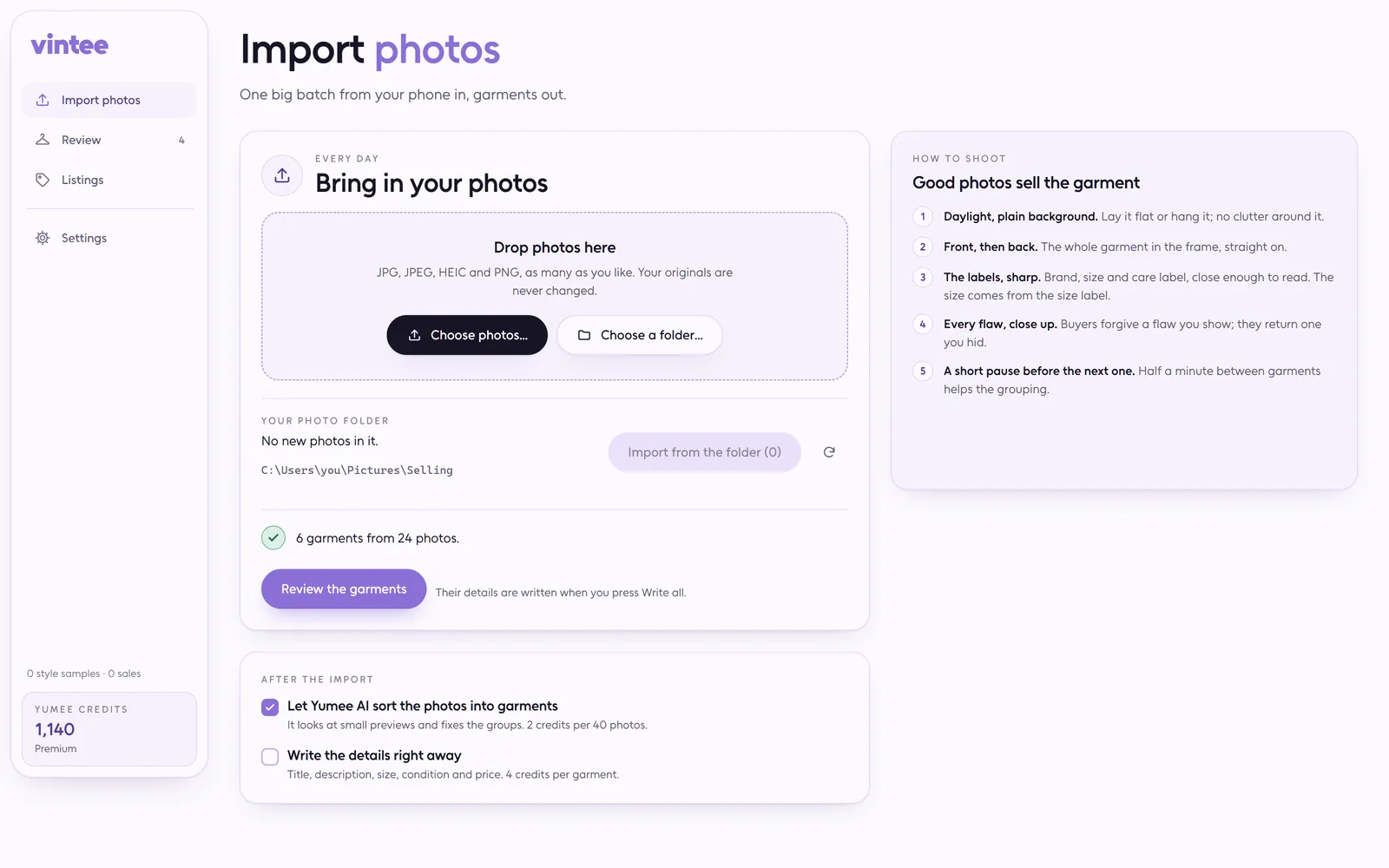
Why you'll love Vintee

  • Sorts the pile for you

    Drop in every JPG, HEIC or PNG from today. Yumee AI groups them into garments; move, split or merge photos where it guessed wrong.

  • Reads the details

    Brand, size from the label, material, colour and condition, each with a note of how sure it is.

  • Prices that make sense

    Quick-sale, suggested and patient prices from a researched guide. Change one and Vintee remembers what your things really sell for.

  • Sounds like you

    Titles and descriptions follow the listings you approved before, not a stiff template.

  • Codes and labels

    Mark as listed gives each garment a code like V-0001 and a sticker with a QR code, 24 to an A4 sheet.

  • Your shop stays yours

    Vintee never signs in to a selling site or posts anything. You paste, you publish, you decide.

Less typing, more selling, and a wardrobe with room to breathe.

How a run goes

  1. Shoot on a phone

    Front, back, details, flaws and the size label. Vintee flags weak photos and missing shots.

  2. Drop the photos

    The whole batch into the window or the drop folder. Yumee AI sorts it into garments.

  3. Analyse the batch

    It runs in the background, a few garments at a time, and tells you what each one cost.

  4. Correct, confirm, list

    Fix what is wrong, confirm, paste it where you sell, then press Mark as listed for a code and a printable label.

What it costs

  • Group photos into garments 2 credits / 40 photos
  • Analyse a garment 4 credits / garment
  • Rewrite a listing 1 credit / garment

Every app shows the price before it starts, and work that fails is refunded on its own.

Plans and credit packs

What it needs

  • Windows 10 or 11, 64-bit
  • A Yumee account, and credits for the garments you analyse
  • About 300 MB for the parts it sets up for you the first time
  • Reads the photos a phone takes: JPG, HEIC and PNG

Download it and open it once: it installs itself, with a shortcut in the Start menu and on the desktop. Sign in with your Yumee account and it gets what it needs with one progress bar. It keeps itself up to date, and your files stay on your PC.

What's new in Vintee

  1. Version 4.0.7

    • Click a garment's photo to see it large inside Vintee; Escape or a click beside it closes it
    • Garments that were being written when Vintee closed go back into the queue, so Write all picks them up
    • The photos Vintee prepares and sends carry no hidden details at all, not even a note left inside the file
    • Vintee says what to do when your account has no room for more listings, your e-mail is not confirmed, or the day's Yumee AI limit is reached
  2. Version 4.0.6

    • Vintee looks for a new version every 15 minutes while it runs and offers the restart right away
    • If Yumee needs the newest Vintee to analyse a batch or save a listing, Vintee tells you in plain words to reopen it
  3. Version 4.0.5

    • Dragging the top strip of the Vintee window moves it from any empty spot, the area above your garments included
    • The version number now sits in small letters after the Vintee name
    • While Yumee AI is busy, analysing a batch waits its turn instead of failing, and sends only as many garments at once as your plan takes
  4. Version 4.0.4

    • When a batch of garments cannot be analysed, Vintee tells you in a plain sentence what to do instead of showing an error code
    • The first-time setup shows simple steps while it gets Vintee ready, and a failed setup says what to press next
  5. Version 4.0.3

    • Windows no longer keeps showing an outdated Vintee icon on your shortcuts after an update
Earlier versions
  1. Version 4.0.2

    • Vintee now prepares your listings for any site where you sell second-hand, not just one
    • Mark as listed replaces the old button, and your listed garments, codes and labels live on the new Listings page
    • Vintee keeps you signed in safely: when our server has a hiccup it still checks your account before it opens
  2. Version 4.0.1

    • Vintee's window and taskbar button show a new icon
  3. Version 4.0.0

    • One phone is all you need: drop in a whole batch of JPG, HEIC or PNG photos and Yumee AI sorts them into garments
    • Size read from the label photo, condition, description and three prices from a Slovak and Czech second-hand price guide
    • Photo tips on every garment: blurry, dark, bad angle, a missing label or back shot
    • Move, split, merge and reorder photos, pick the cover, confirm many garments at once
    • Marking a garment as listed gives it a code and a printable label with a QR code; reserved and sold are kept in your Yumee account
  4. Version 3.0.0

    • New setting: the language your listings are written in
    • Vintee's window can be moved, maximised and resized again
    • Status tabs show how many items each holds, and one line follows the running analysis
    • Vintee downloads only for a signed-in account that can use it
  5. Version 2.0.1

    • Vintee's setup reuses what is already on this PC instead of downloading it again
    • Cancelling setup no longer throws away what was already installed
  6. Version 2.0.0

    • Vintee now opens in its own window on Windows and gets itself ready on the first start
    • Analysis runs on Yumee AI and is paid with credits
    • See your account, plan and credits, and what an analysis costs before you start
    • Your earlier items and settings are brought over once
  7. Version 1.1.0

    • Vintee now asks for your Yumee account before it opens
    • A fresh look for reviewing and approving items
  8. Version 1.0.0

    • Drop in every photo from your iPhone and Sony: Vintee splits them into items and pairs the cameras
    • Calibrate both cameras once so their colours match
    • Brand, size, fabric and condition read from the photos, with a price range and a written listing
    • Review, correct and approve, then copy each field into the site where you sell
    • Prices and wording learn from your corrections, your approved listings and your sales

Questions about Vintee

Do my photos get uploaded?

The originals never move. Yumee AI gets small copies (1024 px, no location or metadata) and keeps nothing. Mark as listed saves one small preview and the listing summary in your Yumee account.

Will it post my listings for me?

No, and that is deliberate. Vintee prepares the photos and the text for whichever site you sell on; you paste them in yourself. Nothing here touches your seller account.

What does a batch cost?

Credits per garment and a small charge for sorting the photos, at the prices on this page. Incomplete garments are refunded; re-analysing one garment is its own small charge.

What language is the copy?

English or Slovak, set in Vintee on its own: the interface follows your Yumee account, and the listings can be in Slovak for Slovak buyers while the app is in English.