
Start with 300 bonus credits if you go Premium in the first 72 hours. See plans

For After Effects

Captionee

Captions that stay editable, inside your comp.

  • Free, no credits
  • Real After Effects layers
  • 34 caption styles

Captionee is a small panel that lives right inside After Effects. It listens to your comp, writes down every word on your own PC, and lets you fix names and typos before anything is built.

Then pick one of 34 styles and it builds real text layers with word-by-word highlighting. No plugin and no surprises on another machine: just layers you can open, restyle and animate like any other. And it's free.

Why might Windows or an antivirus warn about this? Last checked on VirusTotal: 22 October 2026

Last VirusTotal check

22 October 2026 4 days ago

All 60 scanners found nothing in version 3.1.3

Microsoft Defender: clean

Open the full VirusTotal report

Is Captionee safe?

Yes. Captionee does what this page describes and nothing more: it only shares your sign-in with yumee.org, nothing runs until you press a button, and every update is checked against its fingerprint before it replaces anything. You can remove it any time in Settings, Apps.

Then why does a scanner complain?

Because it is new. An app without a paid code-signing certificate starts with no reputation, and a few scanners distrust any unknown program that comes as one file and installs and updates itself. That is a guess from the shape of the file, not something harmful found in it, and it fades as more people use the app.

What the scanners notice in Captionee

  • A zip with a PowerShell installer (Goonieer-Setup.ps1), not a signed Adobe Exchange package.
  • The installer turns on After Effects' PlayerDebugMode so an unsigned panel may load, and puts the old value back when you uninstall.
  • On first use the panel downloads the speech-recognition program and its model, each checked against a pinned SHA-256.
  • It updates itself: it downloads the new zip from yumee.org, checks its size and SHA-256, and runs the installer once After Effects is closed.

Windows stopped it. What now?

On the blue SmartScreen screen choose More info, then Run anyway. If Defender moved it to quarantine, restore it in Windows Security, Protection history, once you have checked the fingerprint below.

How do I know my file is the real one?

Compare its fingerprint. In PowerShell, Get-FileHash on the downloaded file must print exactly this:

SHA-256 of Captionee-3.1.3.zip 5832244f951e48e9a79acbac1ec88b0198dc2605d7cde4fd8db8b46a0a238e2d
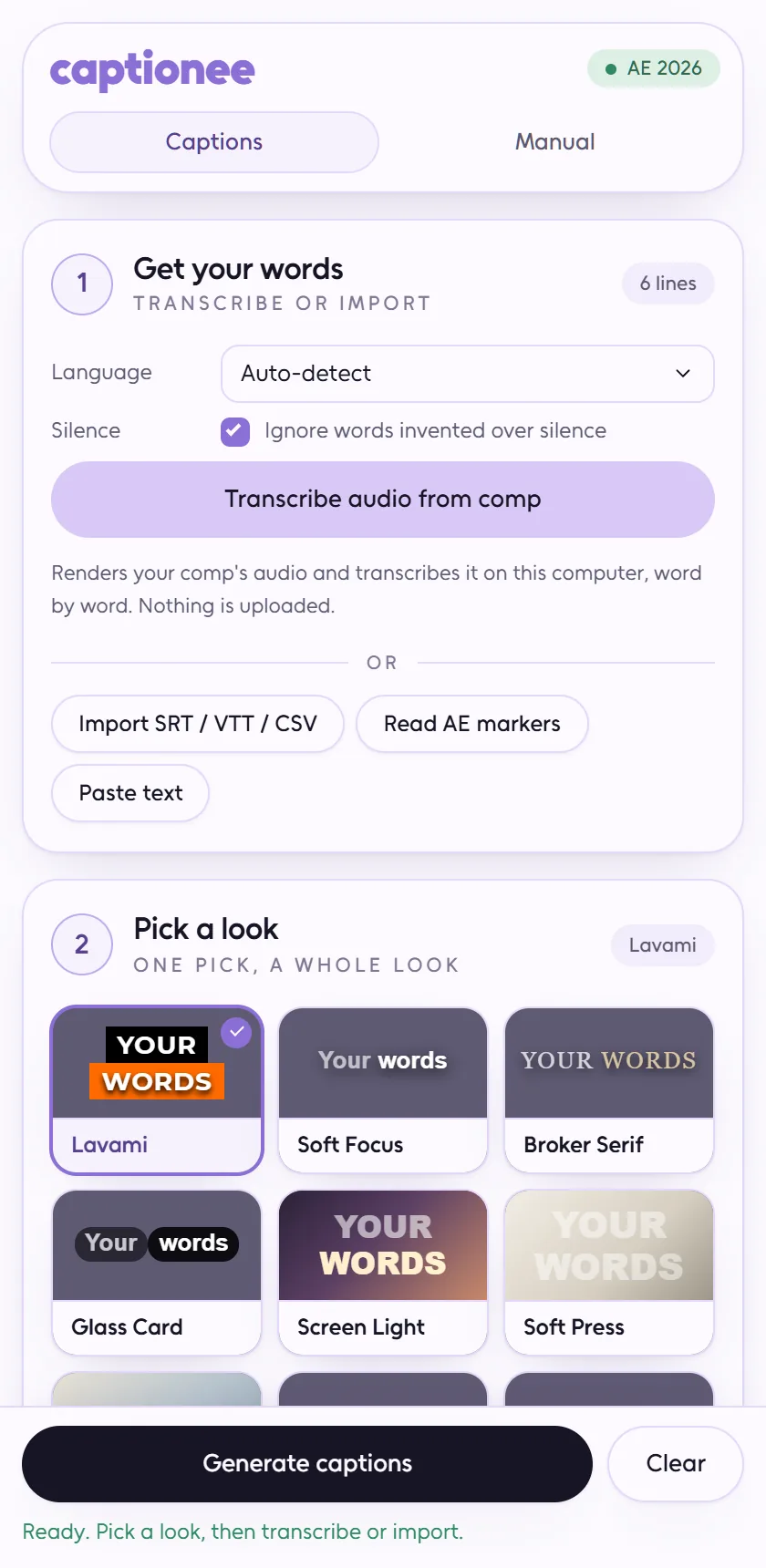
Why you'll love Captionee

  • Listens on your PC

    Transcription runs on your own machine, straight from the comp audio. No upload, no minutes to buy, no credits.

  • Karaoke, word by word

    The highlight is built from After Effects text animators, so it keeps working when you change the font or the colour.

  • Fix first, then build

    Correct the transcript in the panel. Change one line later and only that line is rebuilt.

  • Already have subtitles?

    Bring in SRT, VTT, CSV, comp markers or pasted text and go straight to picking a style.

  • Real layers, nothing hidden

    Everything is plain After Effects text. Nothing to install on a render machine, nothing that stops working next year.

  • One undo, whole run

    A line that fails cleans up after itself, and one Ctrl+Z takes back everything a run made.

Captions that look hand-made, without the hours of keyframing.

How it works

  1. Install the panel

    Close After Effects, run the setup script once, open Window · Extensions · Goonieer.

  2. Transcribe the comp

    Pick the language and how careful it should be; the comp audio is transcribed on your PC.

  3. Fix the words

    Correct names and spellings in the panel. Only the changed lines get rebuilt.

  4. Generate

    Pick a style, press Generate, and the text layers appear in the comp, ready to tweak.

What it costs

Free with your account. Nothing it does costs credits.

Plans and credit packs

What it needs

  • After Effects 22.0 or newer, on Windows
  • A Yumee account — Captionee itself costs no credits
  • The speech recognition downloads once, the first time; the panel walks you through it
  • Setup is one file you run once, with After Effects closed

What's new in Captionee

  1. Version 3.1.3

    • If your Yumee account can no longer use Captionee, the panel says so right away instead of opening on an old answer
    • First-time setup now works on computers whose user folder has an apostrophe in its name
    • Captions with unusual line-break characters, as pasted from documents, no longer fail to build
  2. Version 3.1.2

    • The sizes under Advanced have plain names now, from Smallest to Largest
    • A download or transcription that fails tells you what to do next instead of showing an error code
    • Files you added yourself show as “A file you added”, with a note when they only understand English
  3. Version 3.1.1

    • The Captionee panel now has its own icon in After Effects
  4. Version 3.1.0

    • Pick how accurate transcription should be: Fast, Balanced or Best
    • Plainer messages while downloading and transcribing
    • Captionee now updates itself: one button, then close After Effects
    • Fixed: checking your Yumee account now works on the first try
  5. Version 3.0.0

    • One tidy header with your account and the tabs, and a status line while transcribing
    • Everything it downloads is checked before use
    • Getting the panel from yumee.org now needs an account that can use Captionee
Earlier versions
  1. Version 2.2.1

    • Uninstalling puts back the After Effects setting the installer changed
    • On a Mac, your sign-in is kept in the Keychain
  2. Version 2.2.0

    • An account strip shows your name, plan, credits and a sign-out button
    • Transcription always runs on your computer; the online options and anything saved for them are gone
    • Caption previews sit on a dark background, so white styles stay readable
  3. Version 2.1.0

    • Sign in with your Yumee account from the panel: approve a code, no password in After Effects
    • The panel keeps working offline for 72 hours after your account was last checked
    • A fresh look for the panel
  4. Version 2.0.1

    • Transcribes your comp's audio on your own computer, with word-level timing
    • 34 caption styles with karaoke word highlighting, built as editable After Effects text layers
    • Fix any word in place and rebuild just that line
    • Import SRT, VTT, CSV, markers or pasted text instead of transcribing
    • Silence stays silent: text invented over quiet passages is dropped

Questions about Captionee

Does it cost credits?

No. Everything it does runs on your machine, so a Yumee account is all it needs.

Why is it called Goonieer inside After Effects?

That was its first name, and its folder, the menu entry and every saved preset still carry it. Renaming would break existing installs, so it stayed.

Can I restyle captions after they are made?

Yes. They are ordinary text layers — change the font, the colour, the animation, anything. Editing a built-in style forks your own copy instead of overwriting it.

Does it work on a render farm?

The layers do, because nothing renders them but After Effects itself. The panel is only needed on the machine where you build them.