
Video and photos, side by side
Clips, RAW files, JPEGs and HEICs from the same card, culled in one sitting. A RAW and its JPEG always move together.
Start with 300 bonus credits if you go Premium in the first 72 hours. See plans
For photo and video
A whole card dump, sorted before dinner.
Meet Framee, the friend who happily looks through every clip and photo on the card so you don't have to. Point it at the folder your camera filled and it rates each shot on the things you would check yourself: focus, light, a steady hand, a face with its eyes open.
Your best shots come up first. You make the calls, and Framee does the tidying up.
Last VirusTotal check
24 October 2026 2 days ago
45 of 48 scanners found nothing in version 3.12.1
Microsoft Defender: clean
The 3 that did not guess from how the file is packed, not from anything they found inside (see below). The report shows the name each one gives.
Open the full VirusTotal reportYes. Framee does what this page describes and nothing more: it only shares your sign-in with yumee.org, nothing runs until you press a button, and every update is checked against its fingerprint before it replaces anything. You can remove it any time in Settings, Apps.
Because it is new. An app without a paid code-signing certificate starts with no reputation, and a few scanners distrust any unknown program that comes as one file and installs and updates itself. That is a guess from the shape of the file, not something harmful found in it, and it fades as more people use the app.
What the scanners notice in Framee
On the blue SmartScreen screen choose More info, then Run anyway. If Defender moved it to quarantine, restore it in Windows Security, Protection history, once you have checked the fingerprint below.
Compare its fingerprint. In PowerShell, Get-FileHash on the downloaded file must print exactly this:
SHA-256 of Framee-3.12.1.exe
b67bb0b3c35205a8d5c376ac52e563061f2a31c03314e5d1541e1a62867eac54
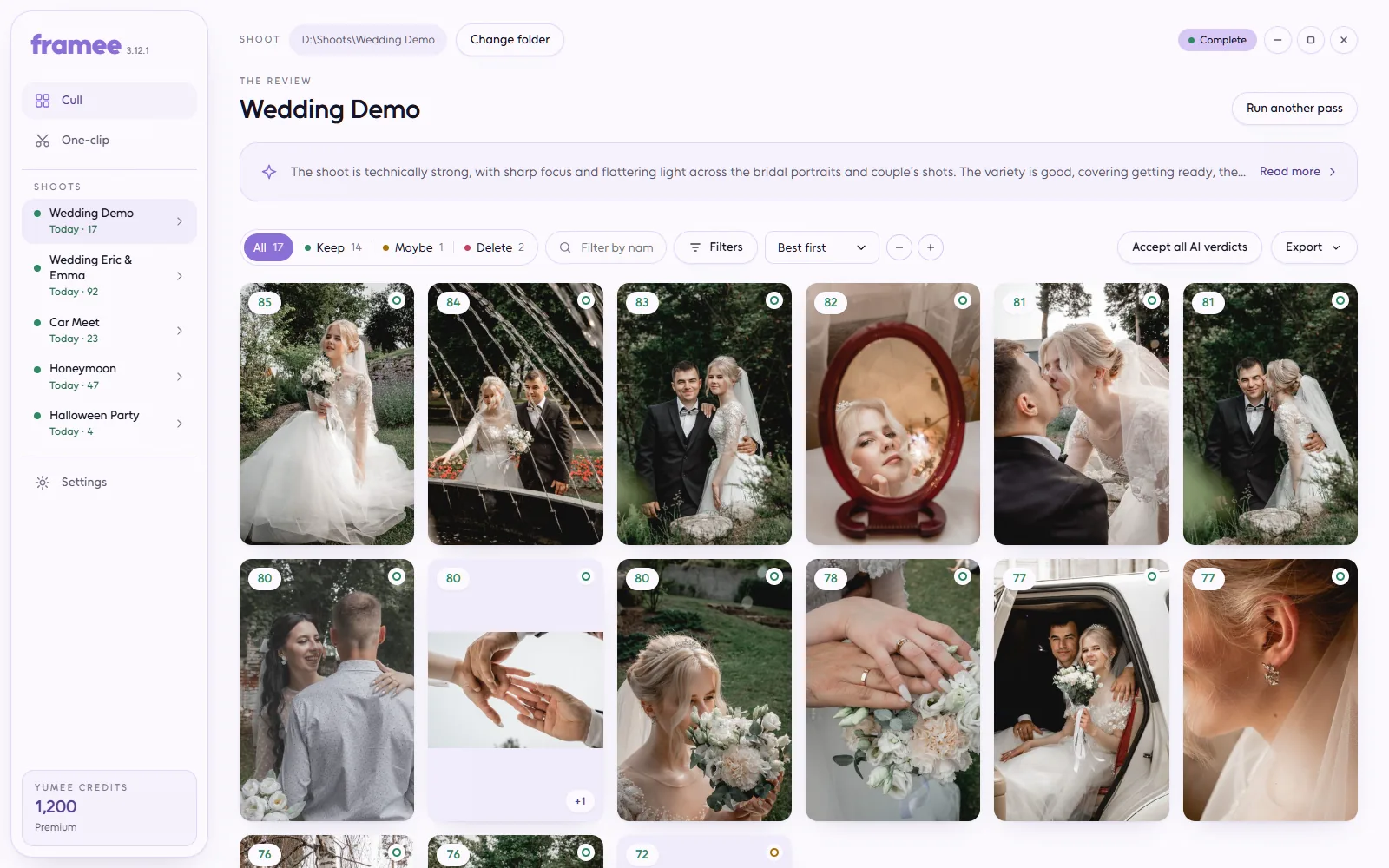
Clips, RAW files, JPEGs and HEICs from the same card, culled in one sitting. A RAW and its JPEG always move together.
Clips are rated on focus, look and steadiness, photos on light, composition and focus. The best rise to the top, and you can see why.
Black frames, lens-cap shots, one-second accidents and blank photos are sorted out on your PC before anything costs a credit.
Keep, Maybe or Delete is always your call. A score never moves a file, and anything you leave undecided stays right where it was.
Changed your mind? Undo puts the last batch back where it came from. Nothing is ever deleted, only moved into folders inside the shoot.
Filmed a whole repair or build in one go? Framee finds the stretches where something happens, says what each one is, and you trim and export.
Less scrolling through hundreds of files, more time with the shots you are proud of.
The card dump as it came off the camera, photos too. Framee writes only inside it.
Frames, contact sheets, the free pre-filter, then the scoring pass. You see the price before it starts.
Keep, Maybe or Delete per clip or photo, with the scores and the filmstrip in front of you.
The files land in cull/, a report is written beside them, and the undo is one command away.
Every app shows the price before it starts, and work that fails is refunded on its own.
Download it and open it once: it installs itself, with a shortcut in the Start menu and on the desktop. Sign in with your Yumee account and it gets what it needs with one progress bar. It keeps itself up to date, and your files stay on your PC.
Version 3.12.1
Version 3.12.0
Version 3.11.3
Version 3.11.2
Version 3.11.1
Version 3.11.0
Version 3.10.1
Version 3.10.0
Version 3.9.4
Version 3.9.3
Version 3.9.2
Version 3.9.1
Version 3.9.0
Version 3.8.2
Version 3.8.1
Version 3.8.0
Version 3.7.2
Version 3.7.1
Version 3.7.0
Version 3.6.0
Version 3.5.1
Version 3.5.0
Version 3.4.3
Version 3.4.2
Version 3.4.1
Version 3.4.0
Version 3.3.0
Version 3.2.3
Version 3.2.2
Version 3.2.1
Version 3.2.0
Version 3.1.0
Version 3.0.0
Version 2.1.0
Version 2.0.0
Version 1.2.0
Version 1.1.0
Version 1.0.0
No. Clips and photos stay in the folder they came from. When Yumee AI looks at a clip, it gets a small contact sheet and nothing else — no file, no audio, no path; a photo goes as a 1024 px copy. Nothing is stored after the answer comes back.
A score never moves a file. Only your Keep / Maybe / Delete does, and a clip you left undecided is never touched. If a whole batch went wrong, one command puts the last move back.
Credits per clip that reaches Yumee AI, at the price shown on this page. Clips the free pre-filter throws out and clips already scored cost nothing, and a run that scores nothing is refunded in full. Photos are charged the same way.
It is built around five hundred clips a shoot. Bigger dumps work as well; they just take longer to read.